
Please read the instructions below before joining
- Set the view-angle of your device as given below so that the teacher can observe the instrument and the student’s hands/fingers clearly.
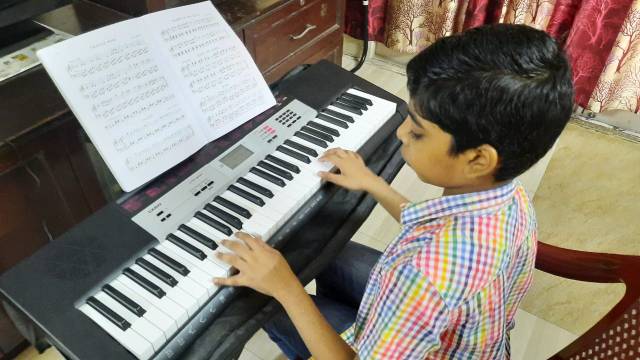




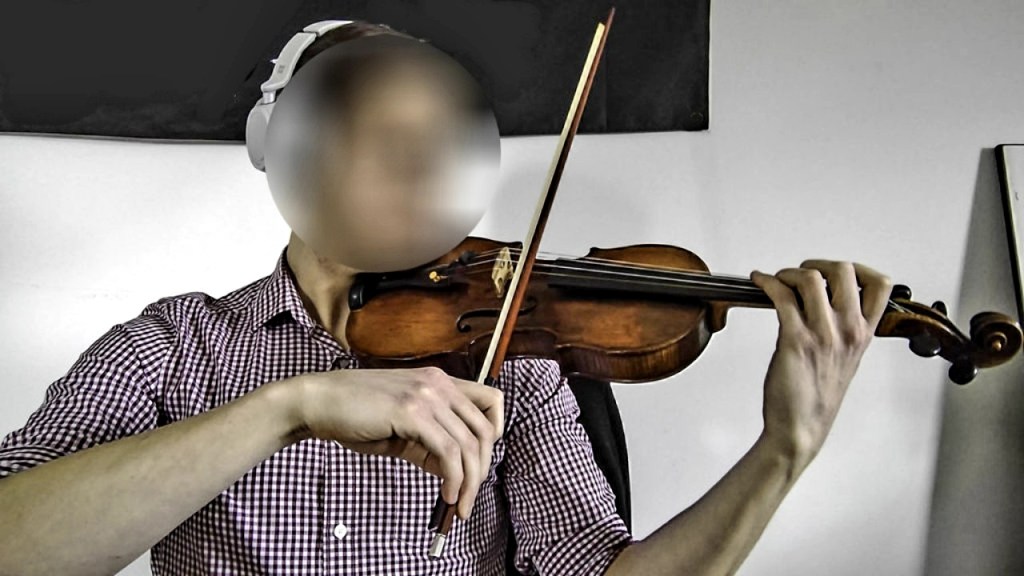
- Please ensure stable Wi-Fi or Mobile Internet connection.
- Turn the Captions on, if the network is weak and/or the audio quality is poor.
- Use the Speaker option on the Microsoft Teams app, or use Wireless (Bluetooth) Headphones. Using Wired Headphones could be uncomfortable.
- Please face the device and speak audibly when needed.
- Please do not mute or turn the video off unless necessary.
- Please do not blur or change the background, as it would obstruct part of the instrument or hand.
- Please do not move the device once it has been set.
- Ensure that the room is well lit.
- Please switch TV and other appliances off to avoid unwanted noise. Please shut the door if necessary.
- Request others at home to maintain silence as much as possible.
Having problems with Microsoft Teams?
You can join using Google Meet or Zoom.
 Yeshua Music School, since 2011